A Unity plugin that integrates the Airship iOS and Android SDKs, exposing a single cross-platform C# API. Apps can share the same integration code across both platforms.
Requirements
- Unity 6+
- iOS: Xcode 16+
- iOS: Minimum deployment target iOS 16+
- Android: minSdkVersion 23, compileSdk/targetSdk 36
- Android: Kotlin 2.2.20+
Resources
- Getting started guide
- API reference
- Migration Guide
Third Party Packages
- External Dependency Manager for Unity - Apache License
Quickstart
- Download the latest
unitypackage - Import the Airship
unitypackage: In Unity, Assets -> Import Package -> Custom Package - Configure Airship using one of the two options below.
Configure with the editor (Settings window)
In Unity, open Window -> Airship -> Settings and enter your app key/secret and options. This generates the native AirshipConfig.plist (iOS) and airship_config.xml (Android).
Configure at runtime (TakeOff)
Alternatively, call TakeOff early in your app lifecycle:
An example script is provided in Assets/Scripts/AirshipBehaviour.cs. Import it into your app's scripts and attach it to a game object in a scene for a basic integration reference.
API
All features are accessed through Airship.Shared:
channel- channel ID, tags, tag groups, attributes, subscription listscontact- named user, tags, attributes, subscription listspush- notification opt-in, push token, notification status, pluspush.iOS(badge, quiet time, foreground presentation and authorization options) andpush.android(notification channels, foreground notifications)messageCenter- Message CenterpreferenceCenter- Preference CenterinApp- In-App Automation / Experiencesanalytics- screen tracking, custom events, associated identifiersprivacyManager- enable/disable data collection featuresfeatureFlagManager- feature flagslocale- locale overridesactions- ActionsliveActivityManager(iOS)liveUpdateManager(Android)
Events such as OnPushReceived, OnPushOpened, OnChannelCreated, OnDeepLinkReceived, OnInboxUpdated, and OnNotificationStatusChanged are exposed on Airship.Shared.
iOS
Enable Push Notifications in the project editor's Capabilities pane:
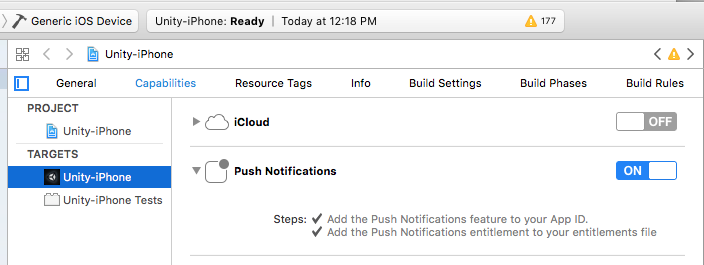
The plugin ships native code as Swift and supports Swift Package Manager. For notification attachments/services, create a notification service extension. See the getting started guide.
Android
Download google-services.json into the Assets directory from the application's Firebase console. The plugin converts it into Android resources during the build (controlled by the "Process google-service" setting in the Settings window).
If proguard is enabled, add the Airship plugin keep rules to proguard-user.txt:
